 CourseGlade
 Audio lessons
Add self-hosted audio lessons with inline playback, attachments, preview, and completion controls.
An audio lesson is a curriculum item with an inline audio player. It is useful for podcasts, spoken lectures, language practice, interviews, and other audio-first teaching.
Add an audio lesson
- Open a course and go to Curriculum.
- Add a module or open an existing module, then choose Audio Lesson from Add New Content.
- Enter the lesson title, description, estimated study time, and status.
- In Audio Source, upload an audio file through the media picker or paste a direct audio-file URL.
- Save the lesson and add it to the module.
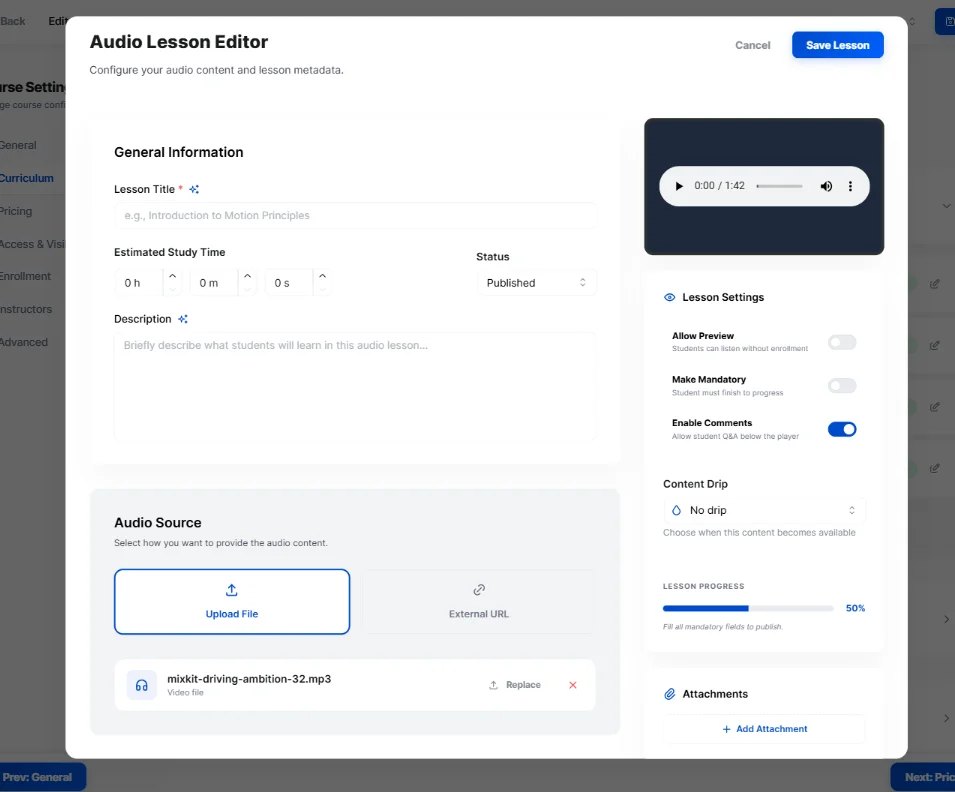
Supported file types include MP3, M4A, WAV, and OGG. Audio lessons use a direct file source; YouTube and Vimeo links are supported for video lessons, not audio lessons.
Lesson settings
Audio lessons support the same learning controls as other lessons:
- Allow Preview — let visitors listen before enrolling
- Make Mandatory — require the student to complete the item before progressing
- Enable Comments — show course Q&A below the lesson
- Attachments — provide downloadable notes, transcripts, or other resources
- Content Drip — with the Pro Content Drip addon, release the audio on a date or after prerequisites
How students listen
Students listen inside learning mode, where the audio player appears with the course curriculum and progress controls. Completion is recorded per student when progress tracking is enabled.